This is the documentation for ConfiForms CLOUD app
ConfiForms app on Atlassian marketplace
Since ConfiForms version 2.20 we now support automatic migration of your forms and data from server to cloud
Please see Differences between ConfiForms server/data center and ConfiForms cloud, as the functionality of cloud version differs from server/data center version
What to expect
- ConfiForms form and views configurations are migrated automatically as they are part of Confluence pages
- ConfiForms migration service (part of Confluence Cloud Migration Assistant) migrates your form's data to cloud, automatically fixing pages, attachments and user references
- ConfiForms migration process also fixes forms' configurations for smart fields and ConfiForms IFTTTs (page references, user/group references)
- Attempts to fix virtual functions that use references to users or pages
ConfiForms expects you to migrate the WHOLE instance, as only this way it can fix usernames to be user accounts, fix user groups, change pages to match the pages on cloud and re-link attachments and fix form configurations (smart fields)
This statement is especially valid for forms that span across multiple Confluence spaces.
Since version 3.17 ConfiForms started to support partial migrations - meaning that migration by Confluence space or spaces is now supported. This will work great when you migrate connected spaces together, so ConfiForms knows how to fix links to other forms, pages and attachments.
To migrate ConfiForms to other than US regions you need a newer version of the app, see below
Also, make sure that the region matches the region where the app is installed - both visible in the ConfiForms app configuration (DC/cloud)
ConfiForms relies on Confluence search to find the pages with ConfiForms forms
Make sure you have search index is in-sync and is up to date. See more Content Index Administration.
Please raise a ticket if something is still un-migrated or broken after the migration and we will try to fix it.
IMPORTANT
Make sure you have updated ConfiForms app to version 3.17 or later.
It is highly recommended that you use absolutely LATEST version of ConfiForms for the cloud migration to use all the features and bug fixes
See our Release Notes and versions https://marketplace.atlassian.com/apps/1211860/confiforms-data-forms-workflows?hosting=datacenter&tab=versions
Migration to EU and AU regions is supported from version 3.19.1 - Release Notes#Version3.19.1
Migration to SG region is supported since version 3.19.8 - Release Notes#Version3.19.8&Version3.20.4
Important note. Please read before migration
Migration initiated through CCMA could not complete on certain configurations, see this blocking bug https://jira.atlassian.com/browse/MIG-837
We are waiting for Atlassian to get it fixed / implemented
While this is getting fixed, the workaround would be as follows: you go through the CCMA migration and then go to your cloud instance and make sure all the pages that have ConfiForms Form Definition macros are accessible to ConfiForms app system user (for example it is accessible to confluence-users group) and then re-run the migration for ConfiForms as shown in step #6 below
We have been notified by another bug in CCMA that affects us
https://jira.atlassian.com/browse/MIG-839
https://jira.atlassian.com/browse/MIG-856
https://jira.atlassian.com/browse/MIG-855
Pre-migration
Make sure you read and understand the differences and accept that the plugin functionality on cloud could not be as versatile as on server/data center. And this is mainly due to differences in hosting platforms and APIs we are allowed to use
Differences between ConfiForms server/data center and ConfiForms cloud
ConfiForms relies on the data provided by Confluence search API.
Make sure you have search index is in-sync and is up to date. See more Content Index Administration.
Also, please run the pre-check report on your Confluence server to understand what forms and pages will have differences in functionality

This is available in the Confluence administration → ConfiForms configuration → Cloud Migration
Direct link
https://YOUR_SERVER/admin/vertuna/confiforms/config.action
Migration process
And this is step number 0 really - please see the Prerequisites on the right to make sure everything mentioned there is done and understood
1. You need to install ConfiForms on cloud instance and generate API token (ConfiForms app configuration - accessible through Confluence administration)
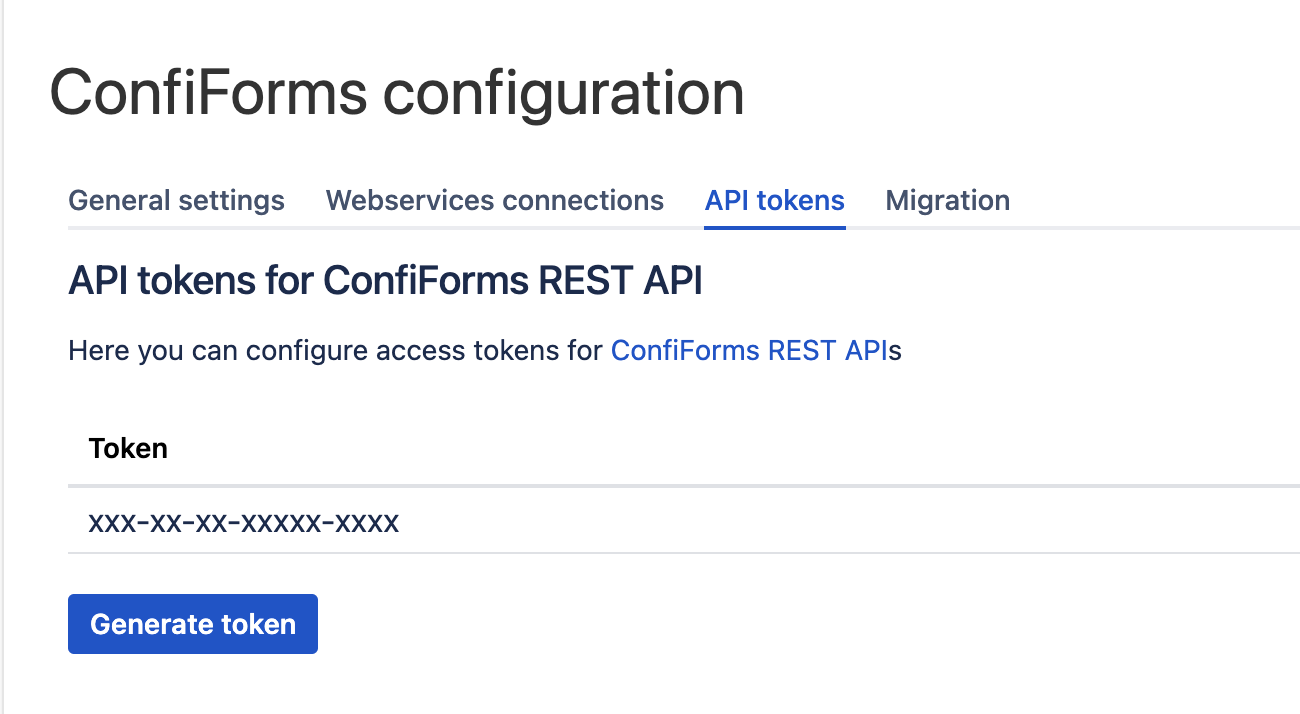
2. Register your cloud instance to receive migration events
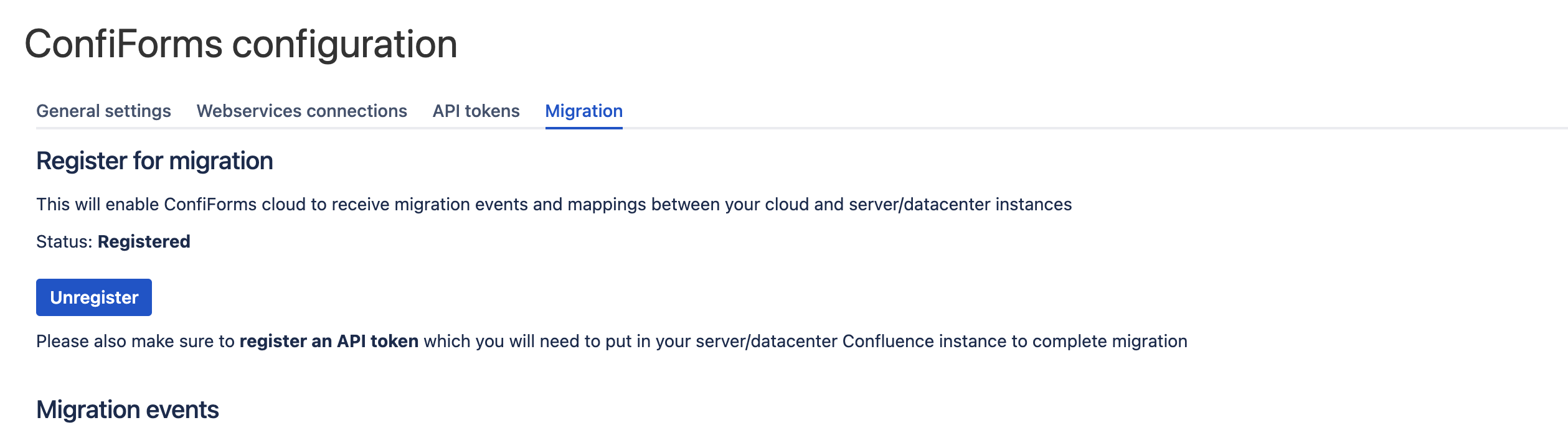
And verify the region it is installed to

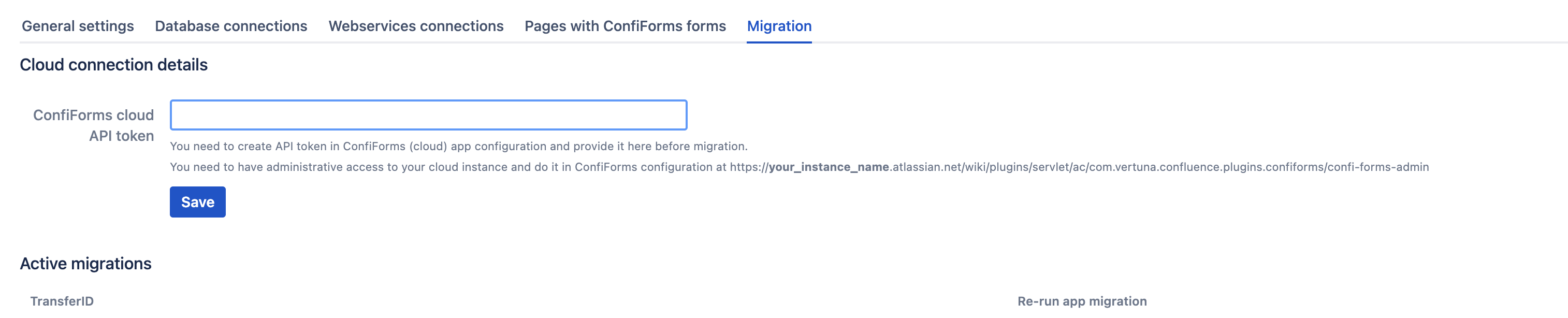
3. This token needs to be registered in ConfiForms server app (ConfiForms app configuration, Manage apps → ConfiForms → Configure)
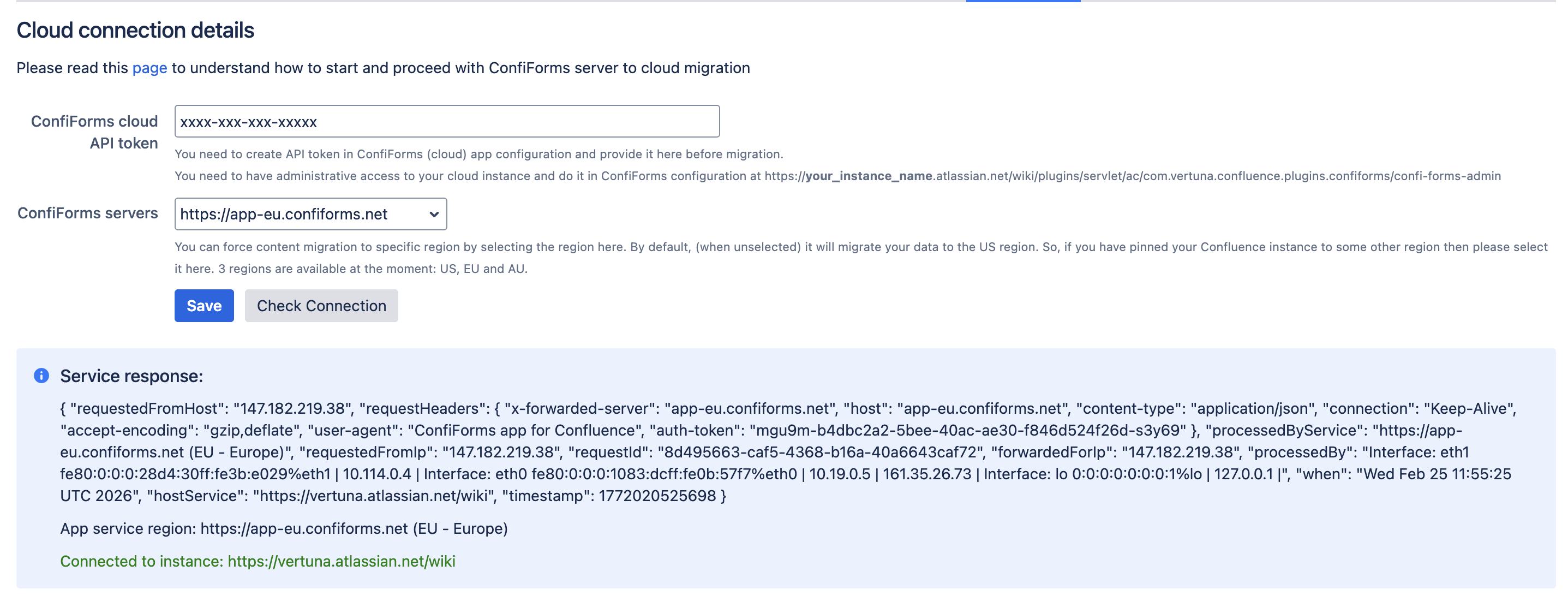
Since version 3.19.8 you can verify the connection to ConfiForms app servers works (after saving the "API token") and is linked to the cloud instance, by clicking on the "Check Connection" button. Make sure the server matches (with #2)
Before you start migration consider enabling DEBUG logging for ConfiForms - How to enable debug logging for ConfiForms app
4. Make sure ConfiForms app user is set to be administrator of your Confluence instance for the time of migration at least. Also see the "How to understand the errors" section and consider registering a super user account in the ConfiForms app configuration. Our attempt to workaround a fundamental issue in the platform https://jira.atlassian.com/browse/MIG-837
5. Start your migration process using Confluence Cloud Migration Assistant (CCMA). Follow documentation on https://www.atlassian.com/migration/cloud/guide/introduction/overview and dont forget to select ConfiForms as required in Cloud when you assess your installed apps (https://www.atlassian.com/migration/cloud/guide/assess/audit-apps)
More on Atlassian CCMA
- https://support.atlassian.com/migration/docs/use-the-confluence-cloud-migration-assistant-to-migrate/
- https://support.atlassian.com/migration/docs/what-migrates-with-the-confluence-cloud-migration-assistant/
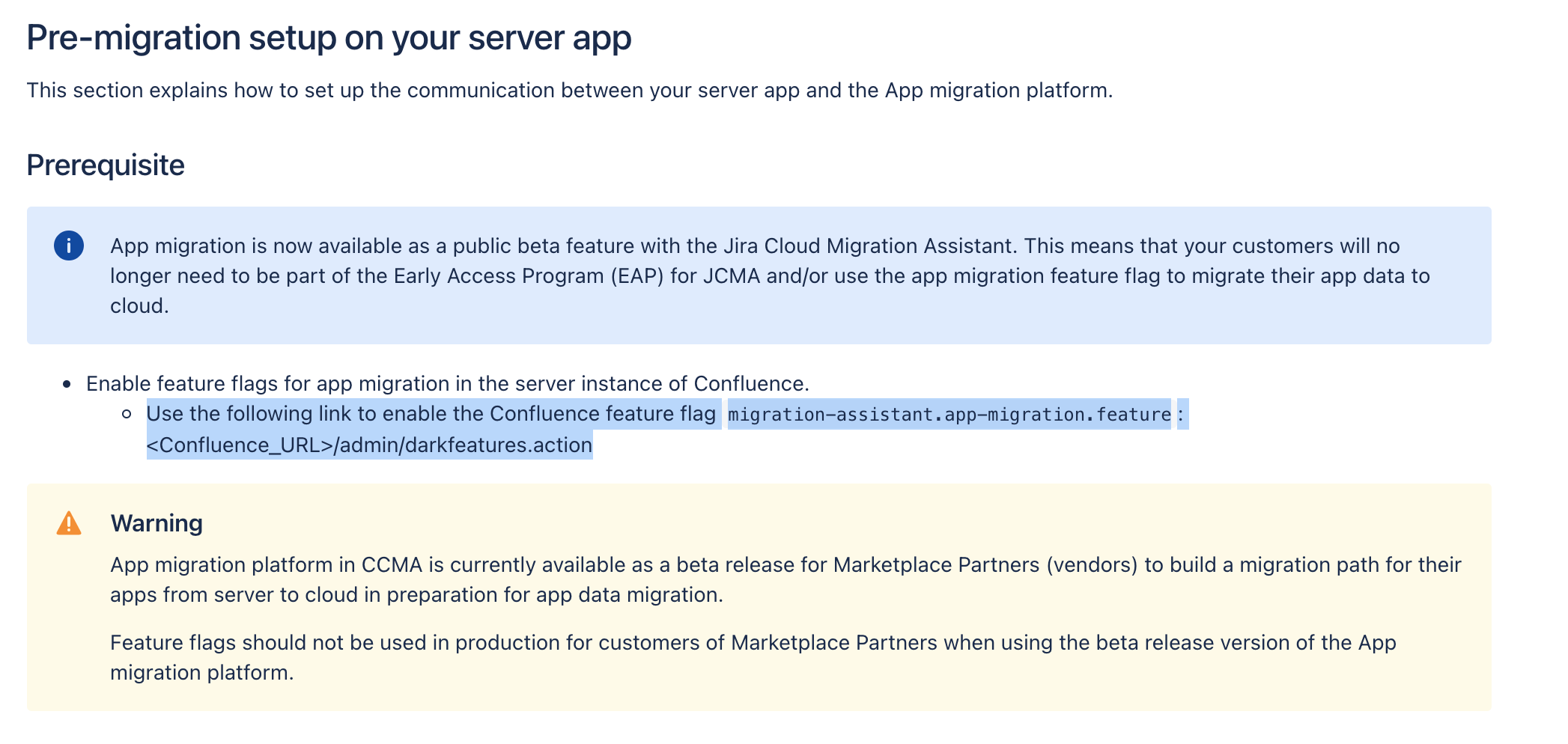
As CCMA is currently in beta you need to enable "dark feature" as per documentation on
https://developer.atlassian.com/platform/app-migration/getting-started/
Screenshot below:
6. ConfiForms migration process will start automatically by CCMA. But you can always re-run it if necessary through the ConfiForms app configuration / migration section

Prerequisites
Your Confluence server MUST have network access to (depending on location)
At the moment we have the following IP addresses
- US (NYC)
- 143.244.202.153 - Load balancer
- 208.68.36.180 (2604:a880:400:d1:0:2:ef04:1) + reserved IP: 146.190.198.32
- 159.89.226.61 (2604:a880:400:d1:0:2:ef01:7001) + reserved IP: 146.190.186.8
- NEW 159.89.49.126 (2604:a880:400:d1:0:4:1ee9:f001) + reserved IP: 134.199.178.245
- EU (Germany, recommended for all EU countries)
- 129.212.141.105 - Load balancer
- 64.226.66.45 (2a03:b0c0:3:f0:0:1:60cb:7000)
- 161.35.26.73 (2a03:b0c0:3:f0:0:1:ef9d:0)
- AU (Sydney)
- 170.64.255.195 - Load balancer
- 170.64.166.124 (2400:6180:10:200::7a8c:e000)
- 170.64.129.124 (2400:6180:10:200::a639:c000)
- SG (Singapore, covers Japan, South Korea)
- 139.59.221.150 - Load balancer
- 165.22.97.4 (2400:6180:0:d2:0:2:5f78:d000)
- 146.190.88.140 (2400:6180:0:d2:0:2:a919:a000)
(uses HTTPS for communication, port 443 (SSL), communication is one way - from YOUR server TO ConfiForms app servers)
Confluence search index
ConfiForms relies on the data provided by Confluence search API.
Make sure you have search index in-sync and up to date. See more Content Index Administration.
Migration compatibility report
Migration compatibility report might be incomplete, as ConfiForms is very flexible at what you can do and how forms could be built and configured.
At the moment we dont support configurations in user macros (which is perfectly supported by the plugin itself). This is work in progress.
Also expressions using virtual functions via [entry.field_name] notations which are not used within macro parameters, but, for example, in macro body (PlainViews or ListViews/CleanViews) are not analyzed / processed.
Current issues
There is a blocking issue with space permissions for the automatic migration path. Atlassian is aware of that and trying to come up with a solution.
We offer a way to "re-run" the migration after it has been ran by CCMA by starting a long running task. This allows you to fix the possible permissions issues and allow ConfiForms app system user to access and update the pages it needs to update (to fix possible configuration issues with smart fields, to move the data from server to cloud)
https://jira.atlassian.com/browse/MIG-837
https://jira.atlassian.com/browse/MIG-839
Consider setting up the super user account

See why this might be handy and necessary - https://jira.atlassian.com/browse/MIG-837
Basically you need to ensure that ConfiForms could access all the pages it needs to access, including with an edit permissions in some cases.
ConfiForms will do it as a ConfiForms cloud app user, but when it fails it will fallback to the super user account provided to retry a workaround and access the necessary pages on behalf of this user account.
How to understand the errors
Most common errors during the migration is the lack of permissions (restricted pages). See this fundamental flaw in Atlassian platform - https://jira.atlassian.com/browse/MIG-837
There are 3 common issues
| Error | ||
|---|---|---|
Form with illegal field names | Page id = XXXXXX -> Error: (raw-import) Requested to https://app.confiforms.net/rest/api/v1/raw/223715434/f2?contentOwnerId=YYYY&serverPageId=XXXXXX has resulted in an error. Response code = 400 (method ='POST'). Response contents: {"timeStamp":"2026-01-15T15:12:07.440+00:00","requestId":"69ec5494-eb1b-41a8-a66b-f7256d281612","message":"Form 'f2' on page with id = 'XXXXXX' misconfiguration. Field name for field definition 'ID' (type = auto) is invalid. Field name can contain only the latin letters and numbers (no spaces), and could not start with a number). And should not use the same name as metadata fields (see documentation). And shall not be longer than 60 symbols. There are some reserved field names you are not allowed to use, such as: submit, cancel, class, elements, pageId. The field name cannot start with 'xml'","error":"Bad Request","status":400};
| ID is a reserved field name that cannot be used in the field definitions. You need to fix the form to have a different name |
Missing VIEW permission Missing EDIT permission (sometimes ConfiForms needs to adjust form's configurations and need to edit the page to do that) | Page id = XXXXXX -> Error: (fix-form-configuration) Requested to https://app.confiforms.net/rest/api/v1/fix-form-configuration/XXXXXX/TRANSFERID?contentOwnerId=ZZZZZZZZ&serverPageId=YYYYYYYY has resulted in an error. Response code = 404 (method ='GET'). Response contents: {"timeStamp":"2024-06-21T09:34:53.954+00:00","message":"Page by id 'XXXXXX' not found","error":"Not Found","status":404};
Page id = XXXXXX -> Error: (fix-form-configuration) Requested to https://app.confiforms.net/rest/api/v1/fix-form-configuration/XXXXXX/TRANSFERID?contentOwnerId=ZZZZZZZZ&serverPageId=YYYYYYYY has resulted in an error. Response code = 403 (method ='GET'). Response contents: {"timeStamp":"2024-06-21T09:35:29.929+00:00","message":"403 Forbidden: "{"statusCode":403,"data":{"authorized":false,"valid":true,"errors":[],"successful":false},"message":"com.atlassian.confluence.api.service.exceptions.PermissionException: Could not update Content of type : class com.atlassian.confluence.pages.Page with id XXXXXX"}"","error":"Forbidden","status":40
| The easiest fix would be to remove restrictions and to retry the migration Also makes sense to register an administrator (super user) account (that has enough permissions) that ConfiForms could use as a fallback to try to do the above mentioned actions This is done in the ConfiForms app configuration on cloud
https://YOUR_INSTANCE.atlassian.net/wiki/plugins/servlet/ac/com.vertuna.confluence.plugins.confiforms/confi-forms-admin?user.isExternalCollaborator=false |
Form name has illegal characters (in very early versions of ConfiForms form naming was less strict | Page id = XXXXXX -> Error: (raw-import) {"timeStamp":"2024-03-30T20:14:39.522+00:00","message":"Illegal form name '2ABC' is given on page with id = 'XXXXX', Form name can contain only the latin letters and numbers (no spaces), and could not start with a number","error":"Bad Request","status":400}
| The easiest way would to make an export in RAW format on DC, and then rename the form to satisfy a stricter rules for form naming. And using the Migration and Recovery API re-import the exported earlier data into the new form and then retrying the migration again For exporting data in RAW format the very same Recovery API could be used |
What is NOT migrated
At the moment ConfiForms does not migrate any web-service, database (this is not supported at all) configurations or secrets

Fields that use web-service configurations need to be manually reconfigured